
One of the most common calls we receive starts with a simple statement:
“I got fingerprinted, and now the FBI sent me two emails. What am I supposed to do?”
Or this:
“I got the emails the FBI sent, but I can’t open the file. I’ve tried everything. What can I do?”
Or:
“I never received any emails you said would come. Is something wrong?”
Applicants are often surprised to learn that receiving an electronic FBI background check involves more than simply opening an email attachment.
The FBI uses a secure retrieval system that requires credentials, a retrieval link, and two-factor authentication before you can access your report.
For many applicants, retrieving the report can actually be more confusing than getting fingerprinted.
The FBI Does Not Simply Email Your Report
Many people assume that once their fingerprints have been submitted, the FBI will send them a PDF attachment containing their background check.
That is not how the electronic FBI background check process works.
Instead, the FBI places your report in a secure retrieval system.
You must log in and download the report yourself.
To do that, the FBI typically sends two separate emails.
- The first contains important retrieval credentials.
- The second contains the secure retrieval link.
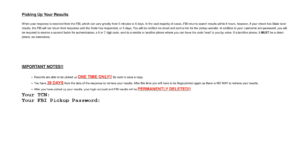
The First Email Contains Information You Must Save
The first email contains information that many applicants overlook.
Most importantly, it contains your:
- TCN, or Transaction Control Number
- FBI Pickup Password
Without these credentials, retrieving your report can become difficult.
We frequently recommend that applicants save this email immediately and avoid deleting it until their report has been successfully downloaded and opened.
The Second Email Contains The Retrieval Link
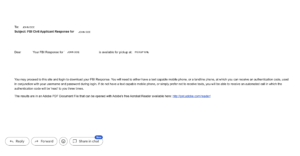
The second email contains the secure website where your FBI Identity History Summary can be retrieved.
You will use the information from the first email together with the retrieval link contained in the second email.
Many applicants mistakenly assume only one email is important and later discover they need information from both messages.
Use A Personal Email Address Whenever Possible
This is one of the most important pieces of advice we give applicants.
Whenever possible, use a personal email account that belongs to you.
Corporate email systems often create unexpected problems.
Many businesses use:
- Spam filtering systems
- Email quarantines
- Security gateways
- Corporate firewalls
As a result, FBI retrieval emails may be delayed, filtered, quarantined, or blocked entirely.
We have seen situations where applicants believed the FBI never sent their report, only to discover later that the email was trapped inside a corporate security system.
There is also a privacy issue.
Your FBI Identity History Summary contains highly sensitive personal information. Employer-provided email accounts are ultimately controlled by the employer, not the applicant.
For both privacy and reliability reasons, we generally recommend using a personal email address.
Do Not Use Someone Else’s Email Address
Applicants occasionally ask whether they can use a spouse’s email account, a friend’s email account, or another family member’s email address.
We do not recommend this.
The retrieval process involves:
- Passwords
- Authentication codes
- Sensitive personal information
- Access to your criminal history record
The safest approach is to use an email account that belongs exclusively to the applicant.
Two-Factor Authentication Surprises Many Applicants
Even after entering the correct credentials, the process is not finished.
The FBI retrieval system typically requires two-factor authentication.
This often involves receiving a code by phone before access is granted.
Applicants who are not expecting this additional step are frequently confused when the system requests verification.
Entering The Credentials Can Be Tricky
The FBI pickup passwords often contain a combination of:
- Uppercase letters
- Lowercase letters
- Numbers
- Special symbols
These passwords can be difficult to enter correctly.
We frequently hear from applicants who accidentally confuse similar-looking characters or miss capitalization requirements.
Carefully entering the credentials exactly as provided is critical.
If The System Stops Accepting Your Information
Repeated login attempts sometimes create browser-related problems.
In some situations, your browser may cache old information and continue presenting errors even after the correct credentials are entered.
If that happens, try:
- Opening an Incognito or Private Browsing window
- Using a different browser
- Clearing your browser cache
Many applicants are surprised to discover that the issue is not the FBI system itself but information stored by their browser.
Download The PDF Immediately
Once your report becomes available, download it immediately.
Do not assume you can always return later and retrieve it again.
Save the PDF to:
- Your computer
- A backup location
- A secure cloud storage account if appropriate
We also recommend opening the PDF immediately after downloading it to verify that the file was saved correctly.
You cannot obtain an apostille with a screen capture of the image. You must use the actual PDF version provided by the FBI.
Do Not Wait Until The Last Day
The FBI retrieval system is designed to protect sensitive information.
For that reason, reports are not stored indefinitely.
Applicants who wait until the last minute occasionally discover problems that could have been resolved much earlier.
Retrieving and saving your report as soon as it becomes available is the safest approach.
Final Thoughts
Many people assume the difficult part of the process is getting fingerprinted.
In reality, we frequently receive more questions about retrieving the report than about the fingerprinting appointment itself.
Understanding how the FBI retrieval system works, using a personal email address, saving both FBI emails, and downloading the PDF immediately can help prevent unnecessary frustration and delays.
If you need assistance obtaining an electronic FBI background check or later obtaining an apostille for international use, understanding these steps early can make the process much smoother.
Frequently Asked Questions
How many emails will the FBI send when my report is ready?
Most applicants receive one email containing credentials and a second email containing the retrieval link.
Can I use my work email address?
We generally recommend using a personal email address because corporate email systems may block or quarantine FBI emails.
Can I use someone else’s email address?
It is generally best to use an email account that belongs exclusively to the applicant.
What should I do after downloading my FBI report?
Open the PDF immediately, verify it works correctly, and save multiple copies in secure locations.
What if the retrieval website keeps rejecting my credentials?
Try using an Incognito window, a different browser, or clearing your browser cache before attempting again.
This article is part of After Your Fingerprints Are Taken, where we cover retrieval, and where applicants actually get stuck.
Also in this section: Why Receiving the Report Is Often Only the Beginning, The FBI Site Sent Me to the Post Office. Do I Have To Go? and You’ve Been Fingerprinted. Now What?.